One day I was ask to see if what are the SQL components installed on the server. It is very easy to check it from SQL Configuration manager if we are checking it for 1 or 2 SQL servers. But in my case my manager gave me a list of 200 SQL servers and asked me to provide the list of components installed and the Version of SQL Servers.
So after some manual work to collect this information I thought that maybe there could be a better way. So I wrote this script to help out. I am providing here T-SQL script which I used in VB Script to get the asked information in one shot for all the servers.
Here is how this script could help you
1. Determine the status of SQL server service(s) - running or not
2. Determine if the service is installed or not
I have executed it on the following servers
1. 32 bit and 64 bit
2. SQL 2005 with SP3 - Stand alone and on multiple instances
3. SQL 2008 with SP1 and SP2 - Stand alone and on multiple instances
4. SQL 2008 R2 latest patches
Hope you find it useful.
T-SQL Script:
/*------------------------------------------*/
/* SQL Server Components Check Utility */
/*------------------------------------------*/
/*------------------------------------------*/
SET NOCOUNT ON
/* ------------------------------------------ Inital Setup -----------------------------------------------------*/
CREATE TABLE #RegResult
(
ResultValue NVARCHAR(4)
)
CREATE TABLE #ServicesServiceStatus /*Create temp tables*/
(
RowID INT IDENTITY(1,1)
,ServerName NVARCHAR(128)
,ServiceName NVARCHAR(128)
,ServiceStatus varchar(128)
,StatusDateTime DATETIME DEFAULT (GETDATE())
,PhysicalSrverName NVARCHAR(128)
)
DECLARE
@ChkInstanceName nvarchar(128) /*Stores SQL Instance Name*/
,@ChkSrvName nvarchar(128) /*Stores Server Name*/
,@TrueSrvName nvarchar(128) /*Stores where code name needed */
,@SQLSrv NVARCHAR(128) /*Stores server name*/
,@PhysicalSrvName NVARCHAR(128) /*Stores physical name*/
,@FTS nvarchar(128) /*Stores Full Text Search Service name*/
,@RS nvarchar(128) /*Stores Reporting Service name*/
,@SQLAgent NVARCHAR(128) /*Stores SQL Agent Service name*/
,@OLAP nvarchar(128) /*Stores Analysis Service name*/
,@REGKEY NVARCHAR(128) /*Stores Registry Key information*/
SET @PhysicalSrvName = CAST(SERVERPROPERTY('MachineName') AS VARCHAR(128))
SET @ChkSrvName = CAST(SERVERPROPERTY('INSTANCENAME') AS VARCHAR(128))
SET @ChkInstanceName = @@serverName
IF @ChkSrvName IS NULL /*Detect default or named instance*/
BEGIN
SET @TrueSrvName = 'MSQLSERVER'
SELECT @OLAP = 'MSSQLServerOLAPService' /*Setting up proper service name*/
SELECT @FTS = 'MSFTESQL'
SELECT @RS = 'ReportServer'
SELECT @SQLAgent = 'SQLSERVERAGENT'
SELECT @SQLSrv = 'MSSQLSERVER'
END
ELSE
BEGIN
SET @TrueSrvName = CAST(SERVERPROPERTY('INSTANCENAME') AS VARCHAR(128))
SET @SQLSrv = '$'+@ChkSrvName
SELECT @OLAP = 'MSOLAP' + @SQLSrv /*Setting up proper service name*/
SELECT @FTS = 'MSFTESQL' + @SQLSrv
SELECT @RS = 'ReportServer' + @SQLSrv
SELECT @SQLAgent = 'SQLAgent' + @SQLSrv
SELECT @SQLSrv = 'MSSQL' + @SQLSrv
END
/* ---------------------------------- SQL Server Service Section ----------------------------------------------*/
SET @REGKEY = 'System\CurrentControlSet\Services\'+@SQLSrv
INSERT #RegResult ( ResultValue ) EXEC master.sys.xp_regread @rootkey='HKEY_LOCAL_MACHINE', @key=@REGKEY
IF (SELECT ResultValue FROM #RegResult) = 1
BEGIN
INSERT #ServicesServiceStatus (ServiceStatus) /*Detecting staus of SQL Sever service*/
EXEC xp_servicecontrol N'QUERYSTATE',@SQLSrv
UPDATE #ServicesServiceStatus set ServiceName = 'MS SQL Server Service' where RowID = @@identity
UPDATE #ServicesServiceStatus set ServerName = @TrueSrvName where RowID = @@identity
UPDATE #ServicesServiceStatus set PhysicalSrverName = @PhysicalSrvName where RowID = @@identity
TRUNCATE TABLE #RegResult
END
ELSE
BEGIN
INSERT INTO #ServicesServiceStatus (ServiceStatus) VALUES ('NOT INSTALLED')
UPDATE #ServicesServiceStatus set ServiceName = 'MS SQL Server Service' where RowID = @@identity
UPDATE #ServicesServiceStatus set ServerName = @TrueSrvName where RowID = @@identity
UPDATE #ServicesServiceStatus set PhysicalSrverName = @PhysicalSrvName where RowID = @@identity
TRUNCATE TABLE #RegResult
END
/* ---------------------------------- SQL Server Agent Service Section -----------------------------------------*/
SET @REGKEY = 'System\CurrentControlSet\Services\'+@SQLAgent
INSERT #RegResult ( ResultValue ) EXEC master.sys.xp_regread @rootkey='HKEY_LOCAL_MACHINE', @key=@REGKEY
IF (SELECT ResultValue FROM #RegResult) = 1
BEGIN
INSERT #ServicesServiceStatus (ServiceStatus) /*Detecting staus of SQL Agent service*/
EXEC xp_servicecontrol N'QUERYSTATE',@SQLAgent
UPDATE #ServicesServiceStatus set ServiceName = 'SQL Server Agent Service' where RowID = @@identity
UPDATE #ServicesServiceStatus set ServerName = @TrueSrvName where RowID = @@identity
UPDATE #ServicesServiceStatus set PhysicalSrverName = @PhysicalSrvName where RowID = @@identity
TRUNCATE TABLE #RegResult
END
ELSE
BEGIN
INSERT INTO #ServicesServiceStatus (ServiceStatus) VALUES ('NOT INSTALLED')
UPDATE #ServicesServiceStatus set ServiceName = 'SQL Server Agent Service' where RowID = @@identity
UPDATE #ServicesServiceStatus set ServerName = @TrueSrvName where RowID = @@identity
UPDATE #ServicesServiceStatus set PhysicalSrverName = @PhysicalSrvName where RowID = @@identity
TRUNCATE TABLE #RegResult
END
/* ---------------------------------- SQL Browser Service Section ----------------------------------------------*/
SET @REGKEY = 'System\CurrentControlSet\Services\SQLBrowser'
INSERT #RegResult ( ResultValue ) EXEC master.sys.xp_regread @rootkey='HKEY_LOCAL_MACHINE', @key=@REGKEY
IF (SELECT ResultValue FROM #RegResult) = 1
BEGIN
INSERT #ServicesServiceStatus (ServiceStatus) /*Detecting staus of SQL Browser Service*/
EXEC master.dbo.xp_servicecontrol N'QUERYSTATE',N'sqlbrowser'
UPDATE #ServicesServiceStatus set ServiceName = 'SQL Browser Service - Instance Independent' where RowID = @@identity
UPDATE #ServicesServiceStatus set ServerName = @TrueSrvName where RowID = @@identity
UPDATE #ServicesServiceStatus set PhysicalSrverName = @PhysicalSrvName where RowID = @@identity
TRUNCATE TABLE #RegResult
END
ELSE
BEGIN
INSERT INTO #ServicesServiceStatus (ServiceStatus) VALUES ('NOT INSTALLED')
UPDATE #ServicesServiceStatus set ServiceName = 'SQL Browser Service - Instance Independent' where RowID = @@identity
UPDATE #ServicesServiceStatus set ServerName = @TrueSrvName where RowID = @@identity
UPDATE #ServicesServiceStatus set PhysicalSrverName = @PhysicalSrvName where RowID = @@identity
TRUNCATE TABLE #RegResult
END
/* ---------------------------------- Integration Service Section ----------------------------------------------*/
SET @REGKEY = 'System\CurrentControlSet\Services\MsDtsServer'
INSERT #RegResult ( ResultValue ) EXEC master.sys.xp_regread @rootkey='HKEY_LOCAL_MACHINE', @key=@REGKEY
IF (SELECT ResultValue FROM #RegResult) = 1
BEGIN
INSERT #ServicesServiceStatus (ServiceStatus) /*Detecting staus of Intergration Service*/
EXEC master.dbo.xp_servicecontrol N'QUERYSTATE',N'MsDtsServer'
UPDATE #ServicesServiceStatus set ServiceName = 'Intergration Service - Instance Independent' where RowID = @@identity
UPDATE #ServicesServiceStatus set ServerName = @TrueSrvName where RowID = @@identity
UPDATE #ServicesServiceStatus set PhysicalSrverName = @PhysicalSrvName where RowID = @@identity
TRUNCATE TABLE #RegResult
END
ELSE
BEGIN
INSERT INTO #ServicesServiceStatus (ServiceStatus) VALUES ('NOT INSTALLED')
UPDATE #ServicesServiceStatus set ServiceName = 'Intergration Service - Instance Independent' where RowID = @@identity
UPDATE #ServicesServiceStatus set ServerName = @TrueSrvName where RowID = @@identity
UPDATE #ServicesServiceStatus set PhysicalSrverName = @PhysicalSrvName where RowID = @@identity
TRUNCATE TABLE #RegResult
END
/* ---------------------------------- Reporting Service Section ------------------------------------------------*/
SET @REGKEY = 'System\CurrentControlSet\Services\'+@RS
INSERT #RegResult ( ResultValue ) EXEC master.sys.xp_regread @rootkey='HKEY_LOCAL_MACHINE', @key=@REGKEY
IF (SELECT ResultValue FROM #RegResult) = 1
BEGIN
INSERT #ServicesServiceStatus (ServiceStatus) /*Detecting staus of Reporting service*/
EXEC master.dbo.xp_servicecontrol N'QUERYSTATE',@RS
UPDATE #ServicesServiceStatus set ServiceName = 'Reporting Service' where RowID = @@identity
UPDATE #ServicesServiceStatus set ServerName = @TrueSrvName where RowID = @@identity
UPDATE #ServicesServiceStatus set PhysicalSrverName = @PhysicalSrvName where RowID = @@identity
TRUNCATE TABLE #RegResult
END
ELSE
BEGIN
INSERT INTO #ServicesServiceStatus (ServiceStatus) VALUES ('NOT INSTALLED')
UPDATE #ServicesServiceStatus set ServiceName = 'Reporting Service' where RowID = @@identity
UPDATE #ServicesServiceStatus set ServerName = @TrueSrvName where RowID = @@identity
UPDATE #ServicesServiceStatus set PhysicalSrverName = @PhysicalSrvName where RowID = @@identity
TRUNCATE TABLE #RegResult
END
/* ---------------------------------- Analysis Service Section -------------------------------------------------*/
IF @ChkSrvName IS NULL /*Detect default or named instance*/
BEGIN
SET @OLAP = 'MSSQLServerOLAPService'
END
ELSE
BEGIN
SET @OLAP = 'MSOLAP'+'$'+@ChkSrvName
SET @REGKEY = 'System\CurrentControlSet\Services\'+@OLAP
END
INSERT #RegResult ( ResultValue ) EXEC master.sys.xp_regread @rootkey='HKEY_LOCAL_MACHINE', @key=@REGKEY
IF (SELECT ResultValue FROM #RegResult) = 1
BEGIN
INSERT #ServicesServiceStatus (ServiceStatus) /*Detecting staus of Analysis service*/
EXEC master.dbo.xp_servicecontrol N'QUERYSTATE',@OLAP
UPDATE #ServicesServiceStatus set ServiceName = 'Analysis Services' where RowID = @@identity
UPDATE #ServicesServiceStatus set ServerName = @TrueSrvName where RowID = @@identity
UPDATE #ServicesServiceStatus set PhysicalSrverName = @PhysicalSrvName where RowID = @@identity
TRUNCATE TABLE #RegResult
END
ELSE
BEGIN
INSERT INTO #ServicesServiceStatus (ServiceStatus) VALUES ('NOT INSTALLED')
UPDATE #ServicesServiceStatus set ServiceName = 'Analysis Services' where RowID = @@identity
UPDATE #ServicesServiceStatus set ServerName = @TrueSrvName where RowID = @@identity
UPDATE #ServicesServiceStatus set PhysicalSrverName = @PhysicalSrvName where RowID = @@identity
TRUNCATE TABLE #RegResult
END
/* ---------------------------------- Full Text Search Service Section -----------------------------------------*/
SET @REGKEY = 'System\CurrentControlSet\Services\'+@FTS
INSERT #RegResult ( ResultValue ) EXEC master.sys.xp_regread @rootkey='HKEY_LOCAL_MACHINE', @key=@REGKEY
IF (SELECT ResultValue FROM #RegResult) = 1
BEGIN
INSERT #ServicesServiceStatus (ServiceStatus) /*Detecting staus of Full Text Search service*/
EXEC master.dbo.xp_servicecontrol N'QUERYSTATE',@FTS
UPDATE #ServicesServiceStatus set ServiceName = 'Full Text Search Service' where RowID = @@identity
UPDATE #ServicesServiceStatus set ServerName = @TrueSrvName where RowID = @@identity
UPDATE #ServicesServiceStatus set PhysicalSrverName = @PhysicalSrvName where RowID = @@identity
TRUNCATE TABLE #RegResult
END
ELSE
BEGIN
INSERT INTO #ServicesServiceStatus (ServiceStatus) VALUES ('NOT INSTALLED')
UPDATE #ServicesServiceStatus set ServiceName = 'Full Text Search Service' where RowID = @@identity
UPDATE #ServicesServiceStatus set ServerName = @TrueSrvName where RowID = @@identity
UPDATE #ServicesServiceStatus set PhysicalSrverName = @PhysicalSrvName where RowID = @@identity
TRUNCATE TABLE #RegResult
END
/* -------------------------------------------------------------------------------------------------------------*/
SELECT PhysicalSrverName AS 'Physical Server Name' /*Display finding*/
,ServerName AS 'SQL Instance Name'
,ServiceName AS 'SQL Server Services'
,ServiceStatus AS 'Current Service Service Status'
,StatusDateTime AS 'Date/Time Service Status Checked'
FROM #ServicesServiceStatus
/* -------------------------------------------------------------------------------------------------------------*/
DROP TABLE #ServicesServiceStatus /*Perform cleanup*/
DROP TABLE #RegResult

I am related to Software Industry working as SQL Database Administrator, so I have created this blog to collect useful information about my area of work. It may contains references to stuff published somewhere else on internet [with full regards to the publisher, of course] and also some of my own. I will also post some out of the box stuff too, if I find it interesting.
Thursday, 10 February 2011


Saturday, 24 January 2009
SQL 2005 Cluster Installation on Mounted Drives
I got a chance to install SQL 2005 in Cluster environment over Mounted Drives. It was a good experience and great learning for me. I am sharing the important things here which we have to keep in mind before starting this activity.
Here is little bit difference in Installation on Normal Drives and Mounted Drives. Because these are LPA servers, you cannot add the accounts to the NT admin group - if they get added we need to get CSS help to remove them so this is a very important thing.
Because of that the permissions need to be set manually on the mounted drives. As they are mount points it can only be done through Disk Manager, not in the file explore and install to the mount points - not a normal install.
So instead of fixed drives like C, D and E, you have to install bits on Mounted Drives.
At any rate, if you do the permissions steps correctly then installation will go pretty smooth.
Prerequisites for Cluster installation of SQL 2005 over Mounted Drives:
Prerequisite 1: Copy the SQL bits on fixed drive.
Prerequisite 2: Add the Service Account in Security Policy on all the nodes.
Below are the lists of entry of Security Policies where we need to add the Service Account before installation:
1. Act as part of the Operating System
2. Adjust Memory quotas for a process
3. Allow log on through terminal Services
4. Backup files and directories
5. Bypass traverse checking
6. Debug programs
7. Increase scheduling priority
8. Lock pages in memory
9. Log on as a batch job
10. Log on as service
11. Manage auditing and security log
12. Replace a process level token
13. Restore files and directories
Prerequisite 3: Grant permission to the Service Account manually on mounted drives through Disk Manager. Don’t use file explore.
Prerequisite 4: Stop MOM, e-Trust and SNMP Services on all nodes.Prerequisite 5: Change NON SIGINGING DRIVE value to 0 on all nodes. (Registry value)Prerequisite 6: Change the environment variable value to C:\TEMP (My Computer -> Properties -> Advance -> Environment Variable) on all nodes.
Prerequisite 7: TS into Active Node using your account. (Check No one logged on passive nodes)
Installation Steps:
Step 1: Run Step.exe from SQL Bits. From here installation will go as per normal installation. Always use mounted drives for DATA file path.
Step 2: Choose the components whatever you want to install like Normal installation.
Step 3: Use the SQL and Agent service account.Step 4: Provide the Domain Group name under which service account exists.
Step 5: Read the information which comes on every dialog box and act accordingly till Finish Button.
Hope these steps will help you a lot whenever you will get a chance to install SQL 2005 over mounted drives.
Here is little bit difference in Installation on Normal Drives and Mounted Drives. Because these are LPA servers, you cannot add the accounts to the NT admin group - if they get added we need to get CSS help to remove them so this is a very important thing.
Because of that the permissions need to be set manually on the mounted drives. As they are mount points it can only be done through Disk Manager, not in the file explore and install to the mount points - not a normal install.
So instead of fixed drives like C, D and E, you have to install bits on Mounted Drives.
At any rate, if you do the permissions steps correctly then installation will go pretty smooth.
Prerequisites for Cluster installation of SQL 2005 over Mounted Drives:
Prerequisite 1: Copy the SQL bits on fixed drive.
Prerequisite 2: Add the Service Account in Security Policy on all the nodes.
Below are the lists of entry of Security Policies where we need to add the Service Account before installation:
1. Act as part of the Operating System
2. Adjust Memory quotas for a process
3. Allow log on through terminal Services
4. Backup files and directories
5. Bypass traverse checking
6. Debug programs
7. Increase scheduling priority
8. Lock pages in memory
9. Log on as a batch job
10. Log on as service
11. Manage auditing and security log
12. Replace a process level token
13. Restore files and directories
Prerequisite 3: Grant permission to the Service Account manually on mounted drives through Disk Manager. Don’t use file explore.
Prerequisite 4: Stop MOM, e-Trust and SNMP Services on all nodes.Prerequisite 5: Change NON SIGINGING DRIVE value to 0 on all nodes. (Registry value)Prerequisite 6: Change the environment variable value to C:\TEMP (My Computer -> Properties -> Advance -> Environment Variable) on all nodes.
Prerequisite 7: TS into Active Node using your account. (Check No one logged on passive nodes)
Installation Steps:
Step 1: Run Step.exe from SQL Bits. From here installation will go as per normal installation. Always use mounted drives for DATA file path.
Step 2: Choose the components whatever you want to install like Normal installation.
Step 3: Use the SQL and Agent service account.Step 4: Provide the Domain Group name under which service account exists.
Step 5: Read the information which comes on every dialog box and act accordingly till Finish Button.
Hope these steps will help you a lot whenever you will get a chance to install SQL 2005 over mounted drives.
Sunday, 4 January 2009
Delete Entry from Services.msc using command or registry key
Create or Delete A Service in Windows:
Services are added from the Command Prompt. You need to know the actual service name as opposed to what Microsoft calls the Display Name. For example, if you wanted to create or delete the Help and Support service, the name used at the Command Prompt would be "helpsvc" rather than the Display Name of "Help and Support". The actual service name can be obtained by typing services.msc in Run on the Start Menu and then double clicking the Display Name of the service. Once you know the name;
To Create A Service
Start Run and type cmd in the Open: line. Click OK.
Type: sc create Service_Name
Reboot the system
To Delete A Service
Start Run and type cmd in the Open: line. Click OK.
Type: sc delete Service_Name
Reboot the system
If you prefer to work in the registry rather than through the command prompt to delete services:
Click Start Run and type regedit in the Open: line. Click OK.
Navigate to HKEY_LOCAL_MACHINE\SYSTEM\CurrentControlSet\Services
Scroll down the left pane, locate the service name, right click it and select Delete.
Reboot the system
Note: Take the registry backup before removing anything from registry.
Ref URL: http://www.theeldergeek.com/add_a_service_in_windows_xp.htm
Services are added from the Command Prompt. You need to know the actual service name as opposed to what Microsoft calls the Display Name. For example, if you wanted to create or delete the Help and Support service, the name used at the Command Prompt would be "helpsvc" rather than the Display Name of "Help and Support". The actual service name can be obtained by typing services.msc in Run on the Start Menu and then double clicking the Display Name of the service. Once you know the name;
To Create A Service
Start Run and type cmd in the Open: line. Click OK.
Type: sc create Service_Name
Reboot the system
To Delete A Service
Start Run and type cmd in the Open: line. Click OK.
Type: sc delete Service_Name
Reboot the system
If you prefer to work in the registry rather than through the command prompt to delete services:
Click Start Run and type regedit in the Open: line. Click OK.
Navigate to HKEY_LOCAL_MACHINE\SYSTEM\CurrentControlSet\Services
Scroll down the left pane, locate the service name, right click it and select Delete.
Reboot the system
Note: Take the registry backup before removing anything from registry.
Ref URL: http://www.theeldergeek.com/add_a_service_in_windows_xp.htm
Saturday, 27 December 2008
Manually Uninstalling SLS
Normally in cluster, we need to manually uninstall the SQL LiteSpeed.
Here the steps for uninstalling the SLS manually:
Delete the following XPs from within master
xp_file_search
xp_sqllitespeed_version
xp_sqllitespeed_licenseinfo
Use the following query for removing the XPs:
if exists (select * from dbo.sysobjects where id =object_id(N'[dbo].[xp_sqllitespeed_licenseinfo]') and OBJECTPROPERTY(id,N'IsExtendedProc') = 1)exec sp_dropextendedproc N'[dbo].[xp_sqllitespeed_licenseinfo]'
if exists (select * from dbo.sysobjects where id =object_id(N'[dbo].[xp_sqllitespeed_version]') and OBJECTPROPERTY(id,N'IsExtendedProc') = 1)exec sp_dropextendedproc N'[dbo].[xp_sqllitespeed_version]'
if exists (select * from dbo.sysobjects where id =object_id(N'[dbo].[ xp_file_search]') and OBJECTPROPERTY(id,N'IsExtendedProc') = 1)exec sp_dropextendedproc N'[dbo].[xp_file_search]'
Remove the following registry entries:
HKLM\SOFTWARE\Imceda
HKCU\Software\Imceda
HKCR\CLSID\{FAB7BBA2…}
Delete the following DLLs from SQL Binn folder:
xpSLS.dll
xpSLSImportStats.dll
xpLogShipping.dll
Delete all parent/child Imceda directories.
Binary files are removed from the directories ($\Imceda\LiteSpeed\SQL Server\Engine\Logs). Any of those parent\child directories should be deleted from all nodes in the cluster.
Tips during the installation of SLS on SQL Cluster:
When installing, installation should be performed from the Active node in the cluster to a drive that is unshared, but common to all nodes. E.g., D: drive (physical not virtual). Also be sure that “Remote Registry” service (svchost.exe) is running to help propagate bits to the passive node\nodes. SLS is cluster aware and should get installed on both nodes.
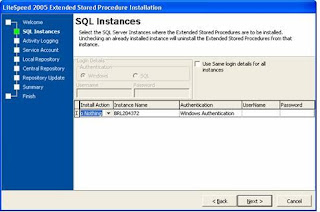
During phase 2 of installation (Instance Configuration: XP Installation), please be sure to choose ‘Do Nothing’ under Install Action for each instance that is active, and is not on the node(Virtual server) currently undergoing installation. Please find the screen shot below:
Here the steps for uninstalling the SLS manually:
Delete the following XPs from within master
xp_file_search
xp_sqllitespeed_version
xp_sqllitespeed_licenseinfo
Use the following query for removing the XPs:
if exists (select * from dbo.sysobjects where id =object_id(N'[dbo].[xp_sqllitespeed_licenseinfo]') and OBJECTPROPERTY(id,N'IsExtendedProc') = 1)exec sp_dropextendedproc N'[dbo].[xp_sqllitespeed_licenseinfo]'
if exists (select * from dbo.sysobjects where id =object_id(N'[dbo].[xp_sqllitespeed_version]') and OBJECTPROPERTY(id,N'IsExtendedProc') = 1)exec sp_dropextendedproc N'[dbo].[xp_sqllitespeed_version]'
if exists (select * from dbo.sysobjects where id =object_id(N'[dbo].[ xp_file_search]') and OBJECTPROPERTY(id,N'IsExtendedProc') = 1)exec sp_dropextendedproc N'[dbo].[xp_file_search]'
Remove the following registry entries:
HKLM\SOFTWARE\Imceda
HKCU\Software\Imceda
HKCR\CLSID\{FAB7BBA2…}
Delete the following DLLs from SQL Binn folder:
xpSLS.dll
xpSLSImportStats.dll
xpLogShipping.dll
Delete all parent/child Imceda directories.
Binary files are removed from the directories ($\Imceda\LiteSpeed\SQL Server\Engine\Logs). Any of those parent\child directories should be deleted from all nodes in the cluster.
Tips during the installation of SLS on SQL Cluster:
When installing, installation should be performed from the Active node in the cluster to a drive that is unshared, but common to all nodes. E.g., D: drive (physical not virtual). Also be sure that “Remote Registry” service (svchost.exe) is running to help propagate bits to the passive node\nodes. SLS is cluster aware and should get installed on both nodes.
During phase 2 of installation (Instance Configuration: XP Installation), please be sure to choose ‘Do Nothing’ under Install Action for each instance that is active, and is not on the node(Virtual server) currently undergoing installation. Please find the screen shot below:

Here are the Xps associated with corresponding DLLs in SQL LiteSpeed:
Ø xpSLS.dll
xp_backup_database
xp_backup_log
xp_delete_tsmfile
xp_file_search
xp_memory_size
xp_objectrecovery
xp_objectrecovery_viewcontents
xp_rebind_tsmmc
xp_restore_checkpassword
xp_restore_database
xp_restore_filelistonly
xp_restore_headeronly
xp_restore_log
xp_restore_setinfo
xp_restore_verifyonly
xp_sls_bcp
xp_slsAddRegMultiString
xp_slsReadProgress
xp_slsRemoveRegMultiString
xp_sqllitespeed_debug
xp_sqllitespeed_licenseinfo
xp_sqllitespeed_version
xp_view_tsmcontents
xp_view_tsmfilespaces
xp_view_tsmmc
Ø xpLogShipping.dll'
xp_slssqlmaint'
Ø xpSLSImportStats.dll
xp_litespeed_importstats
xp_litespeed_readlogs
Ø xpSLS.dll
xp_backup_database
xp_backup_log
xp_delete_tsmfile
xp_file_search
xp_memory_size
xp_objectrecovery
xp_objectrecovery_viewcontents
xp_rebind_tsmmc
xp_restore_checkpassword
xp_restore_database
xp_restore_filelistonly
xp_restore_headeronly
xp_restore_log
xp_restore_setinfo
xp_restore_verifyonly
xp_sls_bcp
xp_slsAddRegMultiString
xp_slsReadProgress
xp_slsRemoveRegMultiString
xp_sqllitespeed_debug
xp_sqllitespeed_licenseinfo
xp_sqllitespeed_version
xp_view_tsmcontents
xp_view_tsmfilespaces
xp_view_tsmmc
Ø xpLogShipping.dll'
xp_slssqlmaint'
Ø xpSLSImportStats.dll
xp_litespeed_importstats
xp_litespeed_readlogs
MSDB database has been corrupted in SQL2000
We now proceed further with following steps:
1. Restart the SQL server using trace flag 3608 then detach msdb databse. (-T3608)2. Navigating to the directory 'C:\Program Files\Microsoft SQL Server\MSSQL.1\MSSQL\Binn' and doing the following: start sqlservr.exe -c -T3608
3. Move or rename the damaged msdb files (msdbdata.mdf and msdblog.ldf in the 'C:\Program Files\Microsoft SQL Server\MSSQL.1\MSSQL\Data' directory)
4. Run the instmsdb.sql script in the 'C:\Program Files\Microsoft SQL Server\MSSQL.1\MSSQL\Install' directory
Shutdown and restart the server without the 3608 trace flag
1. Restart the SQL server using trace flag 3608 then detach msdb databse. (-T3608)2. Navigating to the directory 'C:\Program Files\Microsoft SQL Server\MSSQL.1\MSSQL\Binn' and doing the following: start sqlservr.exe -c -T3608
3. Move or rename the damaged msdb files (msdbdata.mdf and msdblog.ldf in the 'C:\Program Files\Microsoft SQL Server\MSSQL.1\MSSQL\Data' directory)
4. Run the instmsdb.sql script in the 'C:\Program Files\Microsoft SQL Server\MSSQL.1\MSSQL\Install' directory
Shutdown and restart the server without the 3608 trace flag
How to Change collation Change in SQL server 2005 (For Stand Alone/Cluster Server)
How to Change collation Change in SQL server 2005 (For Stand Alone Server)
http://msdn.microsoft.com/en-us/library/ms144259.aspx
start /wait\setup.exe /qn INSTANCENAME=MSSQLSERVER REINSTALL=SQL_Engine REBUILDDATABASE=1 SAPWD= SQLCOLLATION=
Note: SAPWD is not required if SQL is having Windows Authentication.
Point to be considered before collation change for cluster servers. SQL Server 2005 (Cluster Environment)
1. Virtual server name needs to be offline
2. http://support.microsoft.com/kb/q298568/
3. SQL server Browser Services needs to be in stopped state.
Run the below query from the command prompt
start /wait setup.exe /qn VS=cubsnew REINSTALL=SQL_Engine REBUILDDATABASE=1 GROUP=SQL Group NODELIST="tk5siebelpp0a,tk5siebelpp0b" SKUUPGRADE=1 SQLCOLLATION=Latin1_General_CI_AI
VS= SQL Server Virtual NameGROUP= SQL Group
NODELIST=”All Node Name”SKUUPGRADE=1SQLCOLLATION=New Collation Name
For SQL 2008:
Setup /QUIET /ACTION=REBUILDDATABASE /INSTANCENAME= MSSQLSERVER /SQLSYSADMINACCOUNTS= BUILTIN\Administrators /[ SAPWD= StrongPassword ] [ /SQLCOLLATION=CollationName]
http://msdn.microsoft.com/en-us/library/dd207003.aspx
http://msdn.microsoft.com/en-us/library/ms144259.aspx
start /wait
Note: SAPWD is not required if SQL is having Windows Authentication.
Point to be considered before collation change for cluster servers. SQL Server 2005 (Cluster Environment)
1. Virtual server name needs to be offline
2. http://support.microsoft.com/kb/q298568/
3. SQL server Browser Services needs to be in stopped state.
Run the below query from the command prompt
start /wait setup.exe /qn VS=cubsnew REINSTALL=SQL_Engine REBUILDDATABASE=1 GROUP=SQL Group NODELIST="tk5siebelpp0a,tk5siebelpp0b" SKUUPGRADE=1 SQLCOLLATION=Latin1_General_CI_AI
VS= SQL Server Virtual NameGROUP= SQL Group
NODELIST=”All Node Name”SKUUPGRADE=1SQLCOLLATION=New Collation Name
For SQL 2008:
Setup /QUIET /ACTION=REBUILDDATABASE /INSTANCENAME= MSSQLSERVER /SQLSYSADMINACCOUNTS= BUILTIN\Administrators /[ SAPWD= StrongPassword ] [ /SQLCOLLATION=CollationName]
http://msdn.microsoft.com/en-us/library/dd207003.aspx
MSDTC/ Client component issue after SP2 installation SQL2005
Error Displayed in Summary.txt after installation:
MSP Error: 29549 Failed to install and configure assemblies D:\MSSQL_Tools (x86)\90\NotificationServices\9.0.242\Bin\microsoft.sqlserver.notificationservices.dll
MSDTC Event ID: 4384
http://forums.microsoft.com/TechNet/ShowPost.aspx?PostID=2036880&SiteID=17
Checked cluster admin, and sure enough it is not there. You need to register MSDTC as a cluster resource, and then restart setup.
This is known issue, where client tool upgrades will not work unless the Distributed Transaction Coordinator is registered in the MSCS cluster (even if the SQL Engine is not installed)
How to configure Microsoft Distributed Transaction Coordinator on a Windows Server 2003 cluster
http://support.microsoft.com/kb/301600/
How to enable network DTC access in Windows Server 2003
http://support.microsoft.com/kb/817064/
MSP Error: 29549 Failed to install and configure assemblies D:\MSSQL_Tools (x86)\90\NotificationServices\9.0.242\Bin\microsoft.sqlserver.notificationservices.dll
MSDTC Event ID: 4384
http://forums.microsoft.com/TechNet/ShowPost.aspx?PostID=2036880&SiteID=17
Checked cluster admin, and sure enough it is not there. You need to register MSDTC as a cluster resource, and then restart setup.
This is known issue, where client tool upgrades will not work unless the Distributed Transaction Coordinator is registered in the MSCS cluster (even if the SQL Engine is not installed)
How to configure Microsoft Distributed Transaction Coordinator on a Windows Server 2003 cluster
http://support.microsoft.com/kb/301600/
How to enable network DTC access in Windows Server 2003
http://support.microsoft.com/kb/817064/
Subscribe to:
Posts (Atom)